
AI developement, Web Development
Model Context Protocol (MCP) Servers: The Future of AI Communication
By Manahil Umer · · Updated
Artificial Intelligence (AI) is evolving rapidly, and with it, the need for efficient communication protocols between AI models and systems has grown. One such innovation is the Model Context Protocol (MCP), an open standard introduced by Anthropic in November 2024 for connecting AI applications to external tools and data.
This article explains what MCP servers are, how they work, and why they matter in AI. Whether you’re a developer, tech enthusiast, or just curious about AI advancements, this guide will help you grasp the concept easily.
What is MCP?
MCP stands for Model Context Protocol. MCP is a communication standard that allows AI models to exchange contextual information efficiently. Think of it as a “language” that AI systems use to understand and process requests seamlessly.
Instead of thinking in terms of static REST endpoints or rigid GraphQL schemas, MCP encourages a different mindset:
- Let the data models drive the API.
- Expose a contextual interface that clients (and even AI agents) can explore.
- Make it introspective, so tools and users can discover available capabilities on the fly.
In simpler terms: it’s like GraphQL met REST, shook hands with OpenAPI, and then decided to become even smarter.
Explore: A Chrome Extension Case Study: How The Right Software Leverages AI for Rapid Product Development
The Philosophy Behind MCP
Traditional APIs are like vending machines. You press a button (endpoint), and you get what’s pre-configured. But what if the machine could explain itself, suggest things based on context, or even generate new functions as needed?
MCP takes a model-first approach. You define your data structures (models), and the protocol automatically creates a meaningful context around them. Clients can ask:
- What resources are available?
- What actions can I take?
- What data types do you support?
- Can I explore this without reading 100 pages of docs?
This is especially powerful when building tools for automation, AI, or low-code/no-code platforms.
Explore: How AI Helped Us to Improve our Previous WordPress Plugins: A Comprehensive Overview
How Do MCP Servers Work?
MCP servers act as intermediaries between AI models and end-user applications. Here’s a simplified breakdown of their functioning:
- Request Handling – When a user sends a query, the application forwards it to an MCP server.
- Context Management – The MCP server maintains the conversation history, ensuring continuity in interactions.
- Model Coordination – If multiple AI models are involved, the MCP server routes requests to the appropriate model based on context.
- Response Generation – The server compiles responses from AI models and sends them back to the user in a structured format.
This process enables smarter, context-aware AI interactions, improving user experience significantly.
What Does an MCP Server Actually Do?
An MCP server is like a smart brain sitting on top of your database and business logic. It exposes your models and logic through a self-describing API. Let’s break that down.
Key Responsibilities of an MCP Server:
-
Schema Introspection MCP servers expose the structure of your data—fields, types, relationships—through a readable schema. Tools and clients can then explore and understand your backend without prior documentation.
-
Contextual Interfaces Everything in MCP is context-driven. Instead of hardcoding a bunch of REST routes, you navigate through a hierarchy of resources—just like browsing folders in a file system.
-
Dynamic Actions and Tools You can attach custom actions (called tools) to resources. For example:
- A sendInvoice tool on an Order model
- A cancelSubscription tool on a Customer model
-
Natural Language Access (Optional, But Powerful) Many MCP servers integrate with LLMs (Large Language Models), allowing natural language queries like: “Show me all orders from last month with unpaid balances.”
-
Fine-Grained Permissions Role-based access control is built-in. Each user or role sees only the models, fields, and tools they’re allowed to use.
Why Are MCP Servers Important?
1. Enhanced AI Conversations
Without MCP, AI models often treat each query as an isolated request, leading to disjointed responses. MCP servers preserve context, making AI interactions more natural and human-like.
2. Scalability & Efficiency
MCP servers optimize resource usage by efficiently managing multiple AI models. Instead of overloading a single model, they distribute tasks intelligently.
3. Better Integration
MCP allows different AI systems (like chatbots, voice assistants, and recommendation engines) to work together seamlessly, improving overall functionality.
4. Reduced Latency
By maintaining context, MCP servers reduce redundant processing, leading to faster response times.
Building Blocks of an MCP Server
Let’s demystify what goes into building or using an MCP server.
| Concept | Description |
| Models | Your core data structures (e.g., User, Order, Product) |
| Resources | URLs or contexts exposing those models (like /models/user) |
| Context | The current “view” or “location” in the MCP hierarchy |
| Tools | Custom actions (like archive, duplicate, resetPassword) |
| Schema | Self-describing structure of the server (introspectable) |
| Permissions | Role-based access control to limit access and visibility |
Step-by-Step Guide: Building a PostgreSQL Explorer with MCP in Python
Want to turn your PostgreSQL database into an intelligent, prompt-driven assistant? Here’s how you can do it using the Model Context Protocol (MCP) and Python.
Step 1: Install Project Dependencies
Option 1: Use uv (recommended) uv is a fast Python package manager. It simplifies environment setup and dependency management.
- Create a new project:
uv init mcp-server-demo
cd mcp-server-demo
- Add MCP:
uv add “mcp[cli]”
Option 2: Use pip directly
pip install “mcp[cli]”
Step 2: Set Up the PostgreSQL MCP Server
Create a file named server.py and paste the following code:
-
Imports and Database Configuration
from mcp.server.fastmcp import FastMCP
from typing import List, Dict, Any, Optional
import psycopg2
from psycopg2 import pool
import re
from datetime import datetime
import json
import sys
from datetime import date, datetime

# Configure your PostgreSQL connection
DB_CONFIG = {
    "host": "localhost",
    "port": 5432,
    "database": "db_name_here",
    "user": "db_user_here",
    "password": "db_password_here",
    "min_connections": 1,
    "max_connections": 5
}

# Create a connection pool
connection_pool = psycopg2.pool.SimpleConnectionPool(
    minconn=DB_CONFIG["min_connections"],
    maxconn=DB_CONFIG["max_connections"],
    **{k: v for k, v in DB_CONFIG.items() if k not in ["min_connections", "max_connections"]}
)
Explanation:
- Imports necessary libraries (psycopg2 for PostgreSQL, FastMCP for the MCP server).
- Sets up a connection pool to manage database connections efficiently.
- Configuration includes database credentials and connection limits.
Explore: AI receptionist for small business
2. Core Database Functions
def get_db_connection():
    """Get a connection from the pool"""
    return connection_pool.getconn()

def release_db_connection(conn):
    """Release a connection back to the pool"""
    connection_pool.putconn(conn)

def safe_query(sql: str, params=None) -> Dict[str, Any]:
    """Execute a query safely with read-only transaction"""
    if params is None:
        params = []

    conn = None
    try:
        conn = get_db_connection()
        cursor = conn.cursor()

        # Start read-only transaction
        cursor.execute("BEGIN TRANSACTION READ ONLY")
        cursor.execute(sql, params)

        if cursor.description:
            columns = [desc[0] for desc in cursor.description]
            rows = cursor.fetchall()
            result = {
                "rowcount": cursor.rowcount,
                "rows": rows,
                "columns": columns
            }
        else:
            result = {
                "rowcount": cursor.rowcount,
                "rows": [],
                "columns": []
            }

        cursor.execute("COMMIT")
        return result
    except Exception as e:
        if conn:
            conn.rollback()
        raise e
    finally:
        if conn:
            release_db_connection(conn)

def format_table_result(result: Dict[str, Any]) -> str:
    """Format query result as a text table"""
    if not result["rows"]:
        return "No rows returned"

    headers = result["columns"]
    rows = result["rows"]

    # Convert all values to strings
    str_rows = []
    for row in rows:
        str_row = []
        for val in row:
            if val is None:
                str_row.append("NULL")
            elif isinstance(val, (date, datetime)):
                str_row.append(val.isoformat())
            else:
                str_row.append(str(val))
        str_rows.append(str_row)

    # Calculate column widths
    col_widths = [len(h) for h in headers]
    for row in str_rows:
        for i, val in enumerate(row):
            if len(val) > col_widths[i]:
                col_widths[i] = len(val)

    # Build the table
    header_line = " | ".join(h.ljust(w) for h, w in zip(headers, col_widths))
    separator = "-+-".join("-" * w for w in col_widths)
    data_lines = []

    for row in str_rows:
        data_lines.append(" | ".join(val.ljust(w) for val, w in zip(row, col_widths)))

    return f"{header_line}\n{separator}\n" + "\n".join(data_lines)
Key Features:
- safe_query() ensures queries run in a read-only transaction for security.
- format_table_result() converts SQL results into readable ASCII tables.
3. MCP Resources (Schema & Table Exploration)
# Create MCP server
mcp = FastMCP("PostgreSQL Explorer")

# Resource: List all schemas
@mcp.resource("postgres://schemas")
def list_schemas() -> str:
    """List all schemas in the database"""
    try:
        result = safe_query("""
            SELECT schema_name
            FROM information_schema.schemata
            WHERE schema_name NOT IN ('pg_catalog', 'information_schema')
            ORDER BY schema_name
        """)
        schemas = [row[0] for row in result["rows"]]
        return "Available schemas:\n" + "\n".join(schemas)
    except Exception as e:
        return f"Error retrieving schemas: {str(e)}"

# Resource: List tables in a schema
@mcp.resource("postgres://schemas/{schema}/tables")
def list_tables(schema: str) -> str:
    """List all tables in a given schema"""
    try:
        if not re.match(r'^[a-zA-Z0-9_]+$', schema):
            return "Invalid schema name"

        result = safe_query("""
            SELECT table_name
            FROM information_schema.tables
            WHERE table_schema = %s
            ORDER BY table_name
        """, [schema])

        tables = [row[0] for row in result["rows"]]
        return f"Tables in schema '{schema}':\n" + "\n".join(tables)
    except Exception as e:
        return f"Error retrieving tables: {str(e)}"
What It Does:
- list_schemas() retrieves all schemas (excluding system schemas).
- list_tables() lists tables in a specified schema (with input validation).
4. Table Inspection Tools
# Resource: Get table schema
@mcp.resource("postgres://schemas/{schema}/tables/{table}/schema")
def get_table_schema(schema: str, table: str) -> str:
    """Get the schema for a specific table"""
    try:
        if not re.match(r'^[a-zA-Z0-9_]+$', schema) or not re.match(r'^[a-zA-Z0-9_]+$', table):
            return "Invalid schema or table name"

        # Get columns and primary keys
        columns_result = safe_query("""
            SELECT column_name, data_type, is_nullable, column_default
            FROM information_schema.columns
            WHERE table_schema = %s AND table_name = %s
            ORDER BY ordinal_position
        """, [schema, table])

        pk_result = safe_query("""
            SELECT c.column_name
            FROM information_schema.table_constraints tc
            JOIN information_schema.constraint_column_usage AS ccu USING (constraint_schema, constraint_name)
            JOIN information_schema.columns AS c
              ON c.table_schema = tc.constraint_schema
              AND c.table_name = tc.table_name
              AND c.column_name = ccu.column_name
            WHERE tc.constraint_type = 'PRIMARY KEY' AND tc.table_schema = %s AND tc.table_name = %s
        """, [schema, table])

        primary_keys = [row[0] for row in pk_result["rows"]]

        # Format output
        column_lines = []
        for col in columns_result["rows"]:
            col_name, data_type, is_nullable, col_default = col
            is_pk = col_name in primary_keys
            pk_marker = " (PK)" if is_pk else ""
            nullable_marker = "" if is_nullable == 'YES' else " NOT NULL"
            default_marker = f" DEFAULT {col_default}" if col_default else ""
            column_lines.append(f"- {col_name}: {data_type}{pk_marker}{nullable_marker}{default_marker}")

        return f"Schema for {schema}.{table}:\n\n" + "\n".join(column_lines)
    except Exception as e:
        return f"Error retrieving schema: {str(e)}"

# Resource: Get table sample
@mcp.resource("postgres://schemas/{schema}/tables/{table}/sample")
def get_table_sample(schema: str, table: str) -> str:
    """Get a sample of data from a table"""
    try:
        if not re.match(r'^[a-zA-Z0-9_]+$', schema) or not re.match(r'^[a-zA-Z0-9_]+$', table):
            return "Invalid schema or table name"

        result = safe_query(f'SELECT * FROM "{schema}"."{table}" LIMIT 5')
        return f"Sample data from {schema}.{table}:\n\n{format_table_result(result)}"
    except Exception as e:
        return f"Error retrieving sample: {str(e)}"
Features:
- get_table_schema() describes a table’s structure (columns, PKs, NULL constraints).
- get_table_sample() fetches 5 sample rows from a table.
5. SQL Query & Analysis Tools
# Tool: Run SQL query (read-only)
@mcp.tool()
def query(sql: str) -> str:
    """Run a SQL query (read-only)"""
    try:
        dangerous_ops = ['INSERT', 'UPDATE', 'DELETE', 'DROP', 'CREATE', 'ALTER', 'TRUNCATE']
        sql_upper = sql.upper()

        if any(op in sql_upper for op in dangerous_ops):
            return "Error: Only SELECT queries are allowed"

        result = safe_query(sql)
        return f"Query executed. {result['rowcount']} rows returned.\n\n{format_table_result(result)}"
    except Exception as e:
        return f"Error executing query: {str(e)}"

# Tool: Get table statistics
@mcp.tool()
def table_stats(schema: str, table: str) -> str:
    """Get statistics for a table"""
    try:
        if not re.match(r'^[a-zA-Z0-9_]+$', schema) or not re.match(r'^[a-zA-Z0-9_]+$', table):
            return "Invalid schema or table name"

        count_result = safe_query(f'SELECT COUNT(*) FROM "{schema}"."{table}"')
        row_count = count_result["rows"][0][0]

        size_result = safe_query(f"""
            SELECT
                pg_size_pretty(pg_total_relation_size('"{schema}"."{table}"')) as total_size,
                pg_size_pretty(pg_relation_size('"{schema}"."{table}"')) as table_size,
                pg_size_pretty(pg_indexes_size('"{schema}"."{table}"')) as index_size
        """)
        total_size, table_size, index_size = size_result["rows"][0]

        # Build response
        response = [
            f"Statistics for {schema}.{table}:",
            f"Row count: {row_count}",
            f"Total size: {total_size}",
            f"Table size: {table_size}",
            f"Index size: {index_size}"
        ]
        return "\n".join(response)
    except Exception as e:
        return f"Error getting stats: {str(e)}"
Security & Utility:
- query() blocks unsafe SQL operations (e.g., DROP TABLE).
- table_stats() provides metadata like row count and storage size.
6. Search & Prompt-Based Features
# Tool: Find tables by name
@mcp.tool()
def find_tables(search_term: str) -> str:
    """Find tables matching a search term"""
    try:
        result = safe_query("""
            SELECT table_schema, table_name
            FROM information_schema.tables
            WHERE table_schema NOT IN ('pg_catalog', 'information_schema')
              AND (table_schema ILIKE %s OR table_name ILIKE %s)
        """, [f"%{search_term}%", f"%{search_term}%"])

        if not result["rows"]:
            return f"No tables found matching '{search_term}'"

        return "Found tables:\n" + "\n".join(f"{schema}.{table}" for schema, table in result["rows"])
    except Exception as e:
        return f"Error searching tables: {str(e)}"

# Prompt: Analyze table
@mcp.prompt()
def analyze_table(schema: str, table: str) -> str:
    """Prompt for analyzing a table"""
    return (
        f"Analyze {schema}.{table}. Focus on:\n"
        "1. Structure and key fields\n"
        "2. Data patterns and anomalies\n"
        "3. Example queries for deeper analysis"
    )
Use Cases:
- find_tables() enables fuzzy search across schemas.
- analyze_table() generates an AI prompt for table analysis.
7. Startup & Shutdown Handlers
# Test database connection on startup
try:
    conn = get_db_connection()
    cursor = conn.cursor()
    cursor.execute("SELECT version()")
    print(f"Connected to PostgreSQL: {cursor.fetchone()[0]}", file=sys.stderr)
    cursor.close()
    release_db_connection(conn)
except Exception as e:
    print(f"Connection failed: {str(e)}", file=sys.stderr)
    sys.exit(1)

# Graceful shutdown
import signal
def shutdown_handler(signum, frame):
    print("Shutting down...", file=sys.stderr)
    connection_pool.closeall()
    sys.exit(0)
signal.signal(signal.SIGINT, shutdown_handler)
Best Practices:
- Verifies database connectivity at startup.
- Closes connections cleanly on shutdown (SIGINT).
Step 3: Run the Server
You can run the MCP server using the CLI:
uv run mcp dev server.py
Or if you’re using pip:
mcp dev server.py
This will boot up the interactive CLI where you can explore your PostgreSQL database with natural language prompts.
To test the MCP server, you can use Claude Desktop or any other LLM. In this example, I’m using Claude Desktop. After installing Claude Desktop, when you run the command uv run mcp_dev_server.py, it will be added to Claude.
When you open Claude Desktop, you will see a hammer icon where your installed MCP servers will be displayed.
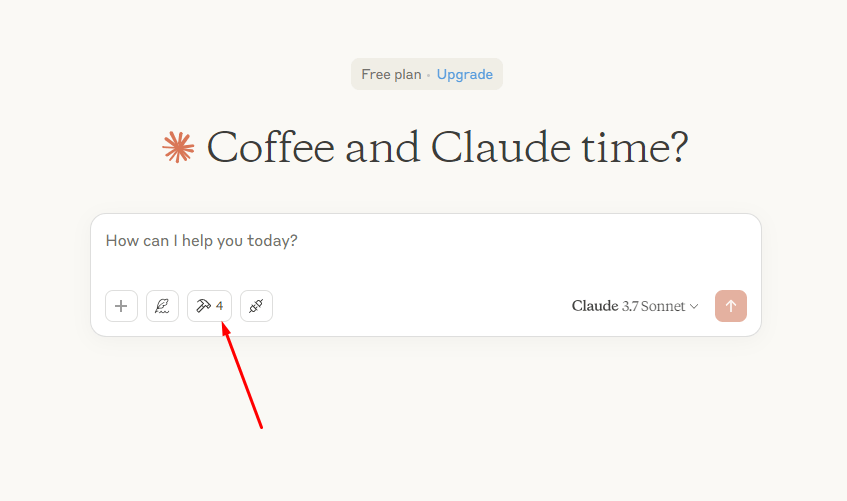
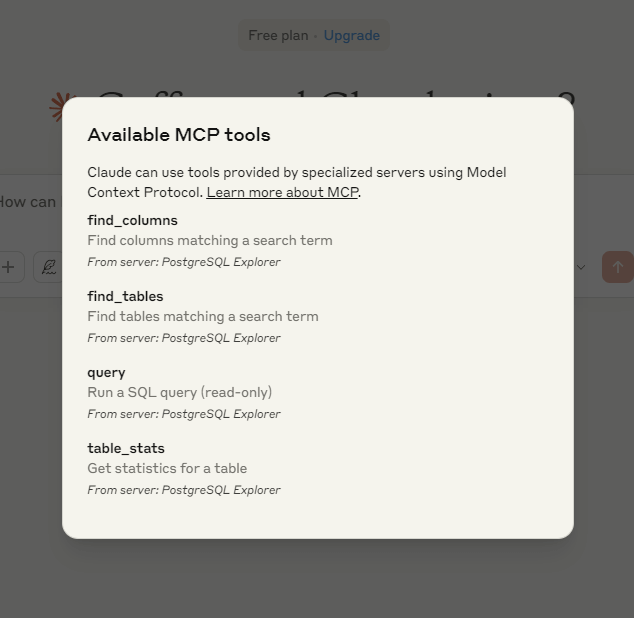
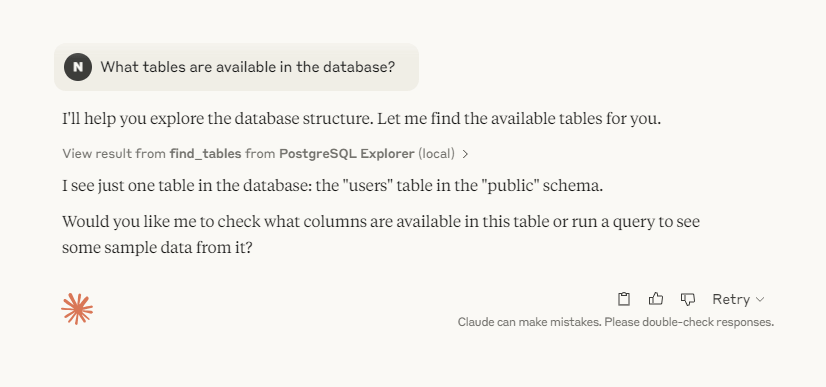
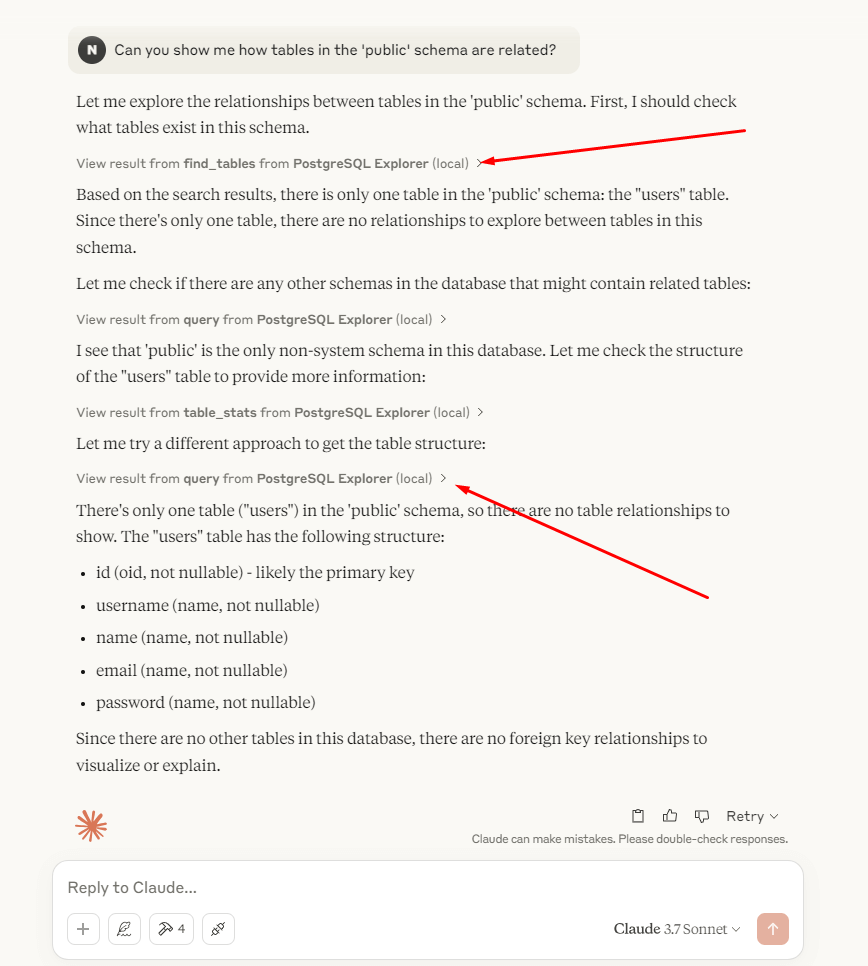
After installation, there are a few prompts that you can try to perform.
Conversational Queries
You can also use natural language, thanks to the query() tool:
- What tables are available in the database?
- Can you show me how tables in the ‘public’ schema are related?
- What columns are in the ‘users’ table?
- How many orders were placed in March 2024?
- What are the top 5 best-selling products by revenue?
- Show me a list of customers from New York who placed more than 3 orders.
- Which employees have not logged in during the last 30 days?
Explore: How AI Helped Us to Improve our Previous WordPress Plugins: A Comprehensive Overview
Real-World Applications of MCP Servers
- Chatbots & Virtual Assistants – More fluid and context-aware conversations.
- Customer Support Systems – AI remembers past interactions, providing personalized solutions.
- Gaming & Interactive AI – NPCs (Non-Player Characters) can respond dynamically based on player history.
- Healthcare & Diagnostics – AI retains patient data for better analysis over time.
Popular MCP Servers (As of 2025)
These are the official starting points for building MCP servers:
- MCP Python SDK – the official Python implementation, used in this guide
- MCP TypeScript SDK – the official SDK for building MCP servers and clients in TypeScript
- Reference servers – example MCP servers maintained alongside the protocol
- Custom Integrations – Many teams build their own server layer using Node.js, PostgreSQL, or MongoDB with MCP specs.
Caution: Use Trusted MCP Implementations Only
Important Security Notice
Always verify that the MCP (Model Context Protocol) server you are using is developed by a reputable and trusted organization or developer.
MCP servers have direct access to your database and system resources, and a malicious implementation could:
- Steal sensitive data
- Corrupt or delete records
- Leak internal infrastructure details
- Execute harmful operations through injected tools or queries
Recommended Safety Tips:
- Always review the source code if the project is open-source.
- Avoid running MCP servers from unknown GitHub repositories or Docker images.
- Prefer officially published versions from known developers or your in-house team.
- Audit enabled tools and ensure role-based access control is enforced.
- Monitor database usage when MCP is active.
When in doubt, don’t plug it into your production database without a full security audit.
Final Thoughts
Model Context Protocol (MCP) servers represent a significant leap in AI communication, making interactions smoother and more intelligent. By maintaining context, optimizing resources, and enabling seamless integration, MCP is paving the way for next-generation AI applications.
Whether you’re a developer building AI solutions or just an enthusiast keeping up with tech trends, understanding MCP servers will give you insight into where AI is headed next.
Need developers to implement MCP with Python and PostgreSQL? DevProvider, our sister company, places them with your team.
Frequently asked questions
What is the Model Context Protocol (MCP)?
MCP is an open standard, introduced by Anthropic in November 2024, that defines how AI applications connect to external tools and data. AI clients talk to MCP servers, which expose resources, tools and prompts in a consistent, self-describing way.
What does an MCP server do?
It sits in front of a data source or system and exposes what an AI model can read (resources) and do (tools), with schemas the model can inspect, plus permissions that limit what each user or role can access.
How do I build an MCP server in Python?
Install the official SDK with uv add "mcp[cli]" or pip install "mcp[cli]", create a FastMCP server, register resources and tools as decorated functions, and run it with mcp dev server.py. AI clients such as Claude Desktop can then connect to it.
Are MCP servers safe?
Only if you trust them. An MCP server can read and change your data, so review the source code, avoid unknown repositories and images, enforce role-based access, monitor database usage and never connect an unaudited server to production.